👁 Read Only by Frazer 👁 230 views
📷 Download as PNG

Riftshaper, the Reality Glitch

Medium Aberration (shapechanger), Chaotic Evil


Armor Class 15 (natural armor)

Hit Points 117 (18d8+36)

Speed 30 ft. fly 40 ft.

STR 16 (+3)
DEX 14 (+2)
CON 14 (+2)
INT 12 (+1)
WIS 14 (+2)
CHA 8 (-1)

Saving Throws Con +5, Wis +5

Skills Stealth +6, Perception +5

Damage Resistances psychic

Condition Immunities charmed, frightened

Senses darkvision 60 ft., passive Perception 15

Languages Common, Deep Speech, Undercommon, telepathy 60 ft.

Challenge 6 (2,300 XP) Proficiency Bonus +3


Phase Shift. The Riftshaper can phase partially into the space between realities. As a bonus action, it can gain resistance to nonmagical damage until the start of its next turn. It can use this ability twice per short rest.
Magic Resistance. The Riftshaper has advantage on saving throws against spells and other magical effects.
Shapechanger. The Riftshaper can use its action to imitate a humanoid appearance it has seen. This is purely cosmetic and does not grant new statistics.

Actions

Multiattack. The Riftshaper makes two Tentacle attacks and one Warped Gaze attack.
Tentacle. Melee weapon Attack: +7 to hit, reach 10 ft., one target. Hit: 11 (2d6+4) slashing damage. If the target is Medium or smaller, it is grappled (escape DC 15).
Warped Gaze. Ranged spell Attack: +6 to hit, range 60 ft., one target. Hit: 10 (2d6+3) psychic damage. The target must succeed on a DC 14 Wisdom saving throw or be frightened for 1 round. On a successful save, the target is immune to this effect for 24 hours.

📷 Export as Image

Share your monster as a beautiful PNG image styled like classic D&D sourcebooks.

📥 Download PNG
Riftshaper, the Reality Glitch Stat Block

Includes: Full stat block, monster image (if selected), CR badge, and QuickMonster branding.

Resolution: High-quality PNG at 2x scale for crisp display on any device.

Lore & Description

Appearance

A rip in the fabric of reality takes the shape of a hulking aberration. Its skin resembles fractured, shifting glass, each fragment shimmering with impossible hues as if a glitch crawled across its surface. Limbs bend at odd angles, and its eyes seem to look in multiple directions at once, reflecting scenes that do not belong to this world. A barely audible static hum surrounds it, and the air around it shivers as if reality itself is sampled and replayed out of sync. When it moves, walls flicker, sounds stutter, and the space around it warps as if the dungeon itself were still loading. It can imitate humanoid forms it has observed, but those feats leak with every movement, like corrupted code breaking free into the physical world.

Behavior & Origins

The Riftshaper is believed to be a manifestation of a reality fractureโ€”an anomaly born when powerful magic or cosmic forces attempted to rewrite the worldโ€™s rules. It does not crave conquest so much as to sample and remix existence, feeding on fear and the sense of unreality it creates. It haunts places where reality feels thin: collapsing city districts, ancient ruins, and tunnels that seem to loop back on themselves. Though chaotic and dangerous, the Riftshaper is often described as curious rather than purely malicious, as if it is testing the boundaries of what can be touched, seen, and remembered in a broken world.

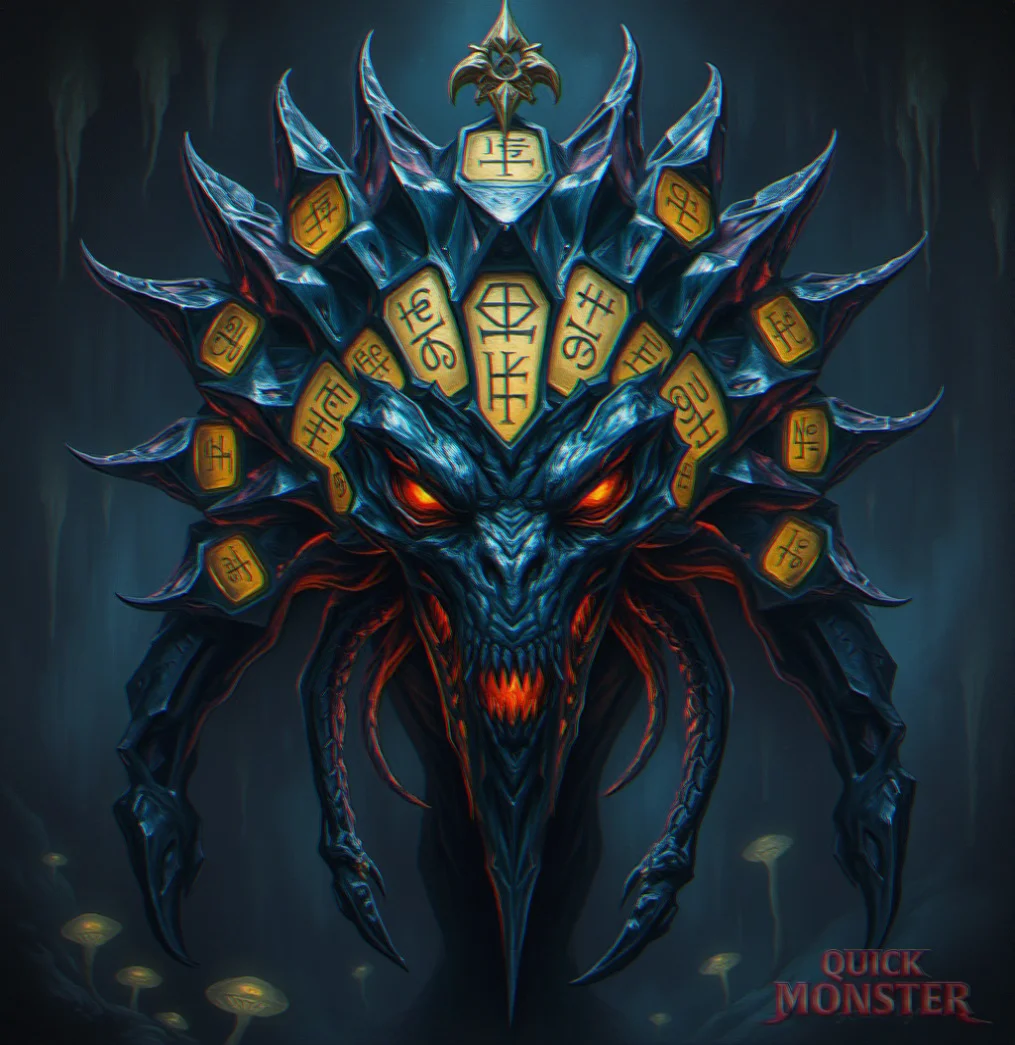
Generation Info

Original prompt:
"A reality glitch taking the shape of a monster."

Created: Feb 2, 2026
Modified: May 22, 2026

Token
📥 Download
๐Ÿ—‘๏ธ

Delete Token?

This action cannot be undone.

🔌

Chrome Extension Required

To export Riftshaper, the Reality Glitch to D&D Beyond, you need the QuickMonster browser extension. It auto-fills the homebrew creator with stats, traits, actions, and images.

1
Install the Extension

Get QuickMonster to D&D Beyond Export from the Chrome Web Store.

2
Refresh This Page

After installing, refresh and click the export button again.

🔌 Get Chrome Extension
🔌

Extension Update Required

To export Riftshaper, the Reality Glitch to Roll20, you need the QuickMonster browser extension version 1.0.3 or later.

1
Install or Update the Extension

Get the latest version from the Chrome Web Store.

2
Refresh This Page

After installing/updating, refresh and try again.